 Pertisk
Documentation
Pertisk KOS Docs
Immutable, API-only Kubernetes node OS with a management plane for Proxmox, ESXi, and Nutanix AHV.
Overview
Pertisk KOS is an immutable, API-only Kubernetes node OS written in Rust. Nodes boot a locked-down Linux image whose only job is to run Kubernetes — managed through a typed API, not SSH.
- Node OS —
pertiskdas PID 1, gRPC management (pertiskctl), containerd + kubelet, serial console dashboard - Management plane —
pertisk-mgmt(API + React UI) creates and operates HA clusters on Proxmox, standalone ESXi, and Nutanix AHV - Create paths — mgmt UI,
pertiskctl(Machine API), or Terraform (pertisk_provider+pertisk_cluster+pertisk_addon) - Add-ons — NFS, cert-manager, Cilium LoadBalancer, Pertisk Ingress, KOS scaler (UI + Terraform)
pertiskctl / mgmt UI / Terraform ──gRPC mTLS / HTTPS──► pertiskd (PID 1) ──► containerd + kubelet
pertisk-mgmt ──HTTPS──► Proxmox API / ESXi SOAP / Nutanix Prism REST
Live demo: ptkos.tools.pertisk.com
Screenshots
From the live demo. Recapture (Playwright):
KOS_USER=admin KOS_PASS=admin npm run capture:kosSerial console and Grafana shots are still manual. Files: public/images/projects/kos/.
Sign-in and home

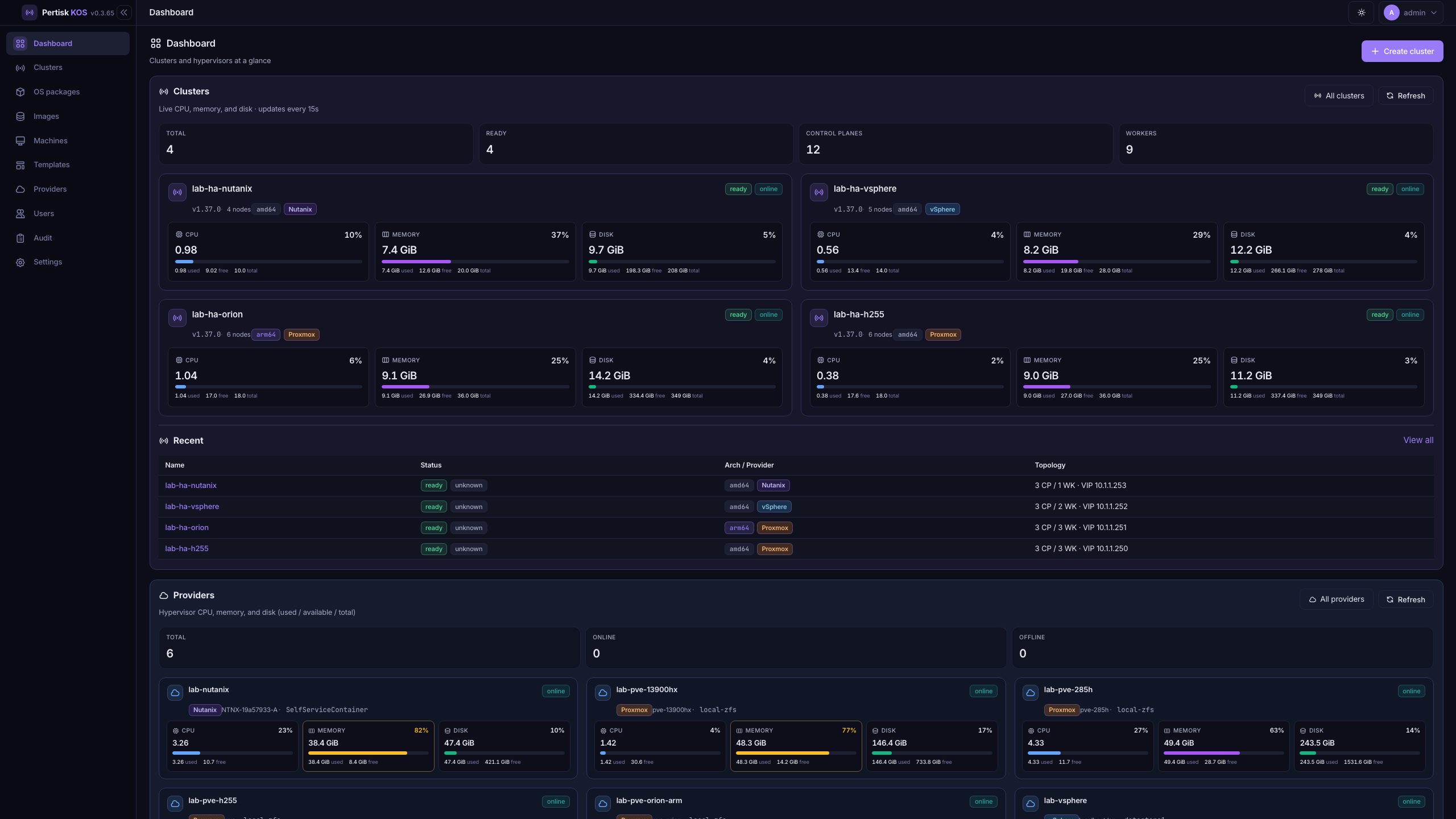


Cluster


Providers and catalog


Serial and observability


Management UI
The UI is a HashRouter app (/#/…). Chrome on every signed-in page: sidebar (collapse), theme toggle, user menu / Sign out.
| Role | Can |
|---|---|
| viewer | Read |
| operator | Mutate clusters / nodes / add-ons / templates / images / OS packages |
| admin | Users + delete providers |
| Page | Path | Actions |
|---|---|---|
| Login | /#/login |
Sign in, Auth0 SSO, Forgot password, Remember password |
| Forgot / reset | /#/forgot-password, /#/reset-password |
Request reset email, set new password |
| Dashboard | /#/ |
Create cluster, All clusters / providers, Refresh, open cards |
| Clusters | /#/clusters |
Create cluster, open a row |
| Create cluster | /#/clusters?new=1 |
Wizard General → Network → Size → Verify → Create |
| Cluster | /#/clusters/:id |
Download kubeconfig, Download config ZIP, Export Terraform, Delete |
| Overview | ?tab=overview |
Copy / View / Download kubeconfig, View jobs |
| Nodes | ?tab=nodes |
Add node (Create VM / Adopt / Join), Reboot, Resize hardware, bulk reboot/remove |
| Node | /#/clusters/:id/nodes/:nid |
Enroll AK, Verify Quote, Refresh / Follow logs |
| K8s | ?tab=k8s |
Namespace + kind filter, Refresh, Scale, Restart, Delete |
| Add-ons | ?tab=addons |
Check config, Install / Update (groups: Autoscaling, Certificates, Ingress, Storage & network) |
| Shell | ?tab=shell |
kubectl / helm on the mgmt host (KUBECONFIG set) |
| Config | ?tab=config |
Apply to all nodes |
| Upgrade | ?tab=upgrade |
Start rolling upgrade, Start OS upgrade |
| Jobs | ?tab=jobs |
Select job, Refresh, Follow |
| OS packages | /#/os-packages |
Upload bundle, Upgrade clusters, Delete |
| Images | /#/images |
Upload qcow2, Delete |
| Machines | /#/machines |
Filter, Refresh, open a node |
| Templates | /#/templates |
Create, Edit, Delete |
| Providers | /#/providers |
Add, Edit, Test, Delete (admin), open dashboard |
| Provider | /#/providers/:id |
Refresh |
| Users | /#/users |
Create, change role, enable/disable, send reset (admin) |
| Audit | /#/audit |
Filter action/resource, Refresh, paging |
| Settings | /#/settings |
Tabs: Session, Service, Paths, Authentication, Email (read-only) |
Provider wizard: Connection → Placement → Test & save. Cluster create HA (controlplanes > 1) needs a VIP outside DHCP.
Full API notes: Management UI in the repo.
Quick start — management UI
export MGMT_ADMIN_USER=admin
export MGMT_ADMIN_PASSWORD=admin
export MGMT_SECRET_KEY=$(openssl rand -hex 32)

make mgmt
./out/bin/pertisk-mgmt --listen 0.0.0.0:8080 --db ./data/mgmt.db
# open http://127.0.0.1:8080
Dev with UI hot reload:
MGMT_ADMIN_PASSWORD=admin cargo run -p pertisk-mgmt -- --listen 127.0.0.1:8080
cd web/mgmt-ui && npm run dev   # :5173 proxies /api → :8080
Lab host deploy (images + mgmt RPM):
./deploy-h255.sh
# or: ARCH=amd64 ./deploy-h255.sh
Quick start — lab clusters
make cloud ARCH=amd64
make pertiskctl

# Proxmox
export PROXMOX_SSH=root@<pve>
./scripts/proxmox-lab-up.sh \
  --controlplanes 3 --workers 3 \
  --vip <free-ip> --cni cilium

# ESXi
# ./scripts/vsphere-lab-up.sh …

# Nutanix AHV (Prism Element)
export NUTANIX_URL=https://<prism>:9440
export NUTANIX_USER=admin
export NUTANIX_PASSWORD='…'
export NUTANIX_STORAGE=SelfServiceContainer
export NUTANIX_NETWORK=vlan.0
export NUTANIX_INSECURE=1
LAB_SUBNET=10.1.1.0/24 ./scripts/nutanix-lab-up.sh --skip-build --cp-vmid 210 --workers 1
Lab-up creates the VMs and bootstraps Kubernetes. To bootstrap by hand after guests are up, use pertiskctl below. To drive the same mgmt jobs as the UI, use Terraform.
Create cluster with pertiskctl
pertiskctl talks to the guest Machine API (:50000). It does not call Proxmox / ESXi / Prism — create VMs first (lab-up, mgmt UI, or Terraform), wait until :50000 answers, then form the cluster.
make pertiskctlSingle control plane
# Endpoint = first CP guest IP (Serial / DHCP)
./out/bin/pertiskctl gen config lab-ha https://<CP_IP>:6443 -o ./out/cluster

./out/bin/pertiskctl -e <CP_IP>:50000 apply -f ./out/cluster/controlplane.yaml
./out/bin/pertiskctl -e <CP_IP>:50000 bootstrap
./out/bin/pertiskctl -e <CP_IP>:50000 kubeconfig -f ./out/cluster/admin.conf
./out/bin/pertiskctl -e <CP_IP>:50000 join-config -f ./out/cluster/worker.yaml

# Per worker (edit hostname in a copy of worker.yaml)
./out/bin/pertiskctl -e <WK_IP>:50000 apply -f ./out/cluster/worker.yaml
HA (stacked etcd + kube-vip)
Pick a free L2 IPv4 outside the DHCP pool. controlplanes > 1 writes kube-vip into the CP configs.
./out/bin/pertiskctl gen config lab-ha https://<VIP>:6443 -o ./out/cluster --controlplanes 3

./out/bin/pertiskctl -e <CP1>:50000 apply -f ./out/cluster/controlplane.yaml
./out/bin/pertiskctl -e <CP1>:50000 bootstrap
./out/bin/pertiskctl -e <CP1>:50000 get-join-config --controlplane --controlplane-index 2 \
  -o ./out/cluster/controlplane-2.yaml
# edit hostname → lab-ha-cp-2, then:
./out/bin/pertiskctl -e <CP2>:50000 apply -f ./out/cluster/controlplane-2.yaml
./out/bin/pertiskctl -e <CP2>:50000 join-controlplane --etcd-endpoints https://<CP1>:2379
# repeat for CP3
Dual-stack (optional IPv6 VIP → certSANs + kube-vip ND):
./out/bin/pertiskctl gen config lab-ha https://10.1.1.210:6443 -o ./out/cluster \
  --controlplanes 3 --dual-stack --vip6 'fd00:1::210'
Useful gen config flags: -k v1.36.3 (Kubernetes version), --max-pods, --mgmt-url, --pod-subnet / --service-subnet.
Bootstrap finalizes once the apiserver is up: bootstrap-token Secret, node-join RBAC, control-plane labels/taints, CoreDNS, metrics-server. Then apply a CNI (cilium lab default, or Calico / Flannel with cni: none).
kubectl --kubeconfig ./out/cluster/admin.conf get nodes -o wideIf create fails with already bootstrapped / node not registered, guests reused disks from a prior run. Destroy the VMs or pertiskctl reset --force leftover guests before apply/join.
Create cluster with Terraform
terraform-provider-pertisk talks to pertisk-mgmt (same API as the UI): register a hypervisor, then create / scale / upgrade / destroy clusters and install add-ons.
Before apply: mgmt is running, pertisk-cloud-{amd64,arm64}.qcow2 is in Images, and mgmt shares L2 with guests (LAB_SUBNET) so MAC→IP works. Address: registry.terraform.io/pertisk-tech/pertisk.
cd tools/terraform-provider-pertisk
make install
cd examples/basic
cp terraform.tfvars.example terraform.tfvars   # secrets, VIP, sizing
terraform init
terraform apply
Auth (or env PERTISK_URL / PERTISK_USERNAME / PERTISK_PASSWORD / PERTISK_TOKEN / PERTISK_INSECURE=1):
provider "pertisk" {
  url      = "https://ptkos.example"
  username = "admin"
  password = var.mgmt_password
  insecure = true # lab self-signed TLS
}
Register a hypervisor
kind is proxmox | vsphere | nutanix. Same Terraform arguments, different meaning per hypervisor:
| Provider | url |
token_id / token_secret |
node |
storage |
bridge |
|---|---|---|---|---|---|
| Proxmox | :8006 |
API token id + secret | PVE node | local-lvm / … |
vmbr0 |
| vSphere | ESXi HTTPS | ESXi username + password | Host | Datastore | Portgroup |
| Nutanix | Prism :9440 |
Prism user + password | Cluster name | Container | Managed network / VLAN |
| Constraint | Detail |
|---|---|
Delete pertisk_provider |
Needs an admin mgmt user |
| Guest arch | arm64 is Proxmox only; ESXi and AHV stay amd64 |
# Proxmox VE
resource "pertisk_provider" "pve" {
  name         = "tf-proxmox"
  kind         = "proxmox"
  url          = "https://10.1.1.10:8006"
  token_id     = "root@pam!pertisk"
  token_secret = var.pve_token_secret
  node         = "pve"
  storage      = "local-lvm"
  bridge       = "vmbr0"
  insecure     = true
}

# Standalone ESXi (not vCenter)
resource "pertisk_provider" "esxi" {
  name         = "tf-esxi"
  kind         = "vsphere"
  url          = "https://10.1.1.20"
  token_id     = "root"
  token_secret = var.esxi_password
  node         = "localhost.lan"
  storage      = "datastore1"
  bridge       = "VM Network"
  insecure     = true
}

# Nutanix AHV (Prism Element :9440)
resource "pertisk_provider" "ahv" {
  name         = "tf-ahv"
  kind         = "nutanix"
  url          = "https://10.1.1.50:9440"
  token_id     = "admin"
  token_secret = var.nutanix_password
  node         = "NTNX-Cluster"
  storage      = "SelfServiceContainer"
  bridge       = "vlan.0"
  insecure     = true
}
Create the cluster
resource "pertisk_cluster" "lab" {
  name          = "tf-lab"
  provider_id   = pertisk_provider.pve.id
  controlplanes = 1
  workers       = 2
  cni           = "cilium"
  cp_vmid       = 310
  k8s_version   = "v1.36.3"

  cp_memory      = 4096
  cp_cores       = 2
  cp_disk_gb     = 50
  worker_memory  = 8192
  worker_cores   = 4
  worker_disk_gb = 75
}
HA + dual-stack (VIP must be free on L2, outside DHCP):
resource "pertisk_cluster" "ha" {
  name          = "tf-lab-ha"
  provider_id   = pertisk_provider.pve.id
  controlplanes = 3
  workers       = 2
  network_mode  = "dual-stack"
  vip           = "10.1.1.210"
  vip6          = "fd00:1::210"
  cni           = "cilium"
  cp_vmid       = 310
}
Swap provider_id for pertisk_provider.esxi.id or pertisk_provider.ahv.id. cp_vmid is Pertisk inventory numbering (210 = first CP, then +1); ESXi MoRef and Prism VM UUID are different — match VMs by name {cluster}-cp-N / {cluster}-wk-N.
Apply waits for the mgmt create job (default timeout_minutes = 45). Outputs: id, status, endpoint, kubeconfig (sensitive).
Create-time vs scale
controlplanesandworkersare initial size only. Later HCL changes are ignored.- Scale with
pertisk_node(mode = "create"ormode = "adopt"). - Changing
k8s_versiontriggers an in-place rolling upgrade (no replace). - Changing sizing, network, CNI, VIP, or
cp_vmidforces replace.
resource "pertisk_node" "extra_worker" {
  cluster_id = pertisk_cluster.lab.id
  role       = "worker"
  mode       = "create"
}

resource "pertisk_addon" "nfs" {
  cluster_id = pertisk_cluster.lab.id
  addon      = "nfs"
  config = {
    server = "10.1.1.150"
    path   = "/mnt/nfs_share"
  }
}
reuse_addons = true (default) restores saved add-on configs when you recreate a cluster with the same name. See Add-ons.
Node OS
| Topic | Detail |
|---|---|
| Image | Same cloud image for controlplane and worker (role comes from machine config) |
| PID 1 | pertiskd: GPT / STATE / EPHEMERAL disks, DHCP or static net, containerd, kubelet, signed A/B updates |
| Serial | Talos-style status TUI on Proxmox / ESXi / AHV Serial |
| Arch | amd64 / arm64 initramfs + cloud qcow2/raw |
| Updates | A/B OS with Ed25519-signed bundles (pertisk-update / pertisk-sign) |
| Secure Boot | UKI lab path (make uki, make enroll-ovmf) |
| Guest extras | nfs-client, qemu-guest-agent |
| Observe | gRPC mTLS :50000, Prometheus :50001, pertiskctl logs / attest / quote / etcd / containers / interfaces / disks |
Cluster lifecycle
| Step | How |
|---|---|
| CLI | pertiskctl gen config → apply → bootstrap → join (pertiskctl) |
| IaC | pertisk_provider + pertisk_cluster + pertisk_addon (Terraform) |
| UI | Clusters → Create (same mgmt jobs as Terraform) |
| Bootstrap | First CP: PKI + static pods (etcd, apiserver, controller-manager, scheduler) |
| Join | Workers and extra control planes (stacked etcd) |
| HA | controlplanes > 1 → stacked etcd + kube-vip VIP |
| Upgrade | Rolling: drain → bump version → Ready → uncordon |
| Add-ons | After Ready: NFS, cert-manager, Cilium LB, Pertisk Ingress, KOS scaler |
| kubeconfig | Cluster page, Terraform output, or pertiskctl kubeconfig |
Add-ons
When a cluster is ready, cluster → Add-ons (or Terraform pertisk_addon). Check config then Install / Update. CoreDNS and metrics-server stay bootstrap basics (not this tab). Manifests: examples/addons.
Group tabs: Autoscaling · Certificates · Ingress · Storage & network.
| Add-on | Group | Installs |
|---|---|---|
| KOS scaler | Autoscaling | Helm pertisk/kos-scaler — worker VMs via pertisk-mgmt |
| cert-manager | Certificates | cert-manager v1.21.1 + Cloudflare DNS-01 ClusterIssuer + optional wildcard TLS (reflected to every namespace) |
| Pertisk Ingress | Ingress | Helm pertisk-ingress into pertisk-proxy (Harbor image, arch-pinned) |
| NFS storage | Storage & network | pertisk-nfs-modules DaemonSet + nfs-subdir-external-provisioner (StorageClass nfs-client) |
| Cilium LoadBalancer | Storage & network | CiliumLoadBalancerIPPool + L2 announcements (listed only when CNI is cilium) |
| Topic | Detail |
|---|---|
| Typical order | NFS → cert-manager → Cilium LB → Ingress → KOS scaler |
| Ingress | type: LoadBalancer — install Cilium LB first on Cilium clusters |
| KOS scaler PVC | Defaults to nfs-client (install NFS first, or set StorageClass to none) |
| Presets | Saved by cluster name (encrypted tokens). Delete keeps the preset; recreate restores forms (Reuse add-on config, on by default). Copy with addon_preset |
| Jobs | Add-on installs run in parallel; they wait only if this cluster already has a create / upgrade / node job. Exclusive jobs still run one at a time |
| Secrets | Encrypted at rest (MGMT_SECRET_KEY), never returned by the API. Ingress and KOS scaler need helm on the mgmt PATH |
KOS scaler
pertisk-kos-scaler scales worker VMs for clusters provisioned by pertisk-mgmt. It watches Kubernetes scheduling pressure and calls the management API to create or remove workers on the hypervisor (Proxmox / ESXi / Nutanix). This is node autoscaling — it complements HPA, it does not replace it.
Kubernetes scheduling pressure → kos-scaler → pertisk-mgmt → hypervisor worker VMs- Enforces worker min / max
- Scales up from unschedulable pending pods or CPU/memory utilization
- Scale-down: cordon → Eviction API drain (honors PDBs) →
DELETEworker via mgmt - Pauses while Pertisk jobs (
add_node/remove_node/upgrade_cluster) are running
UI: Add-ons → Autoscaling. The cluster UUID and management public URL are filled in; the account must be admin or operator.
helm repo add pertisk https://chart.tools.pertisk.com
helm upgrade --install kos-scaler pertisk/kos-scaler \
  --namespace kos-scaler --create-namespace \
  --set mgmt.endpoint=https://ptkos.example \
  --set mgmt.clusterId=<cluster-uuid> \
  --set mgmt.username=admin \
  --set mgmt.password=…
cert-manager
Let’s Encrypt via Cloudflare DNS-01. UI: Add-ons → Certificates. Needs a Cloudflare token with Zone:DNS:Edit. Optional wildcard domain issues apex + *.domain and copies the TLS Secret into every namespace (kubernetes-reflector). The webhook is patched onto the host network (port 10260) so Cilium kubeProxyReplacement can reach it.
Pertisk Ingress
Helm chart pertisk/pertisk-ingress (https://chart.tools.pertisk.com) into pertisk-proxy. Public Harbor image harbor.tools.pertisk.com/pertisk-proxy/ingress (default tag v0.1.83), pinned to cluster arch so ARM nodes do not pull amd64. Optional admin host + TLS Secret from cert-manager (or HTTP only).
NFS storage
External NFS server (mgmt host or NAS) + nfs-subdir-external-provisioner. Guests need the nfs-client image extension (No such device without it). Check config probes TCP 2049 from the mgmt host.
Cilium LoadBalancer
L2 ELB IPs (CiliumLoadBalancerIPPool + CiliumL2AnnouncementPolicy). Use a free L2 address (not the VIP or a node IP). IPv6 field is shown on dual-stack.
Terraform pertisk_addon
Same catalog as the UI. Changing config / secrets re-runs install. Destroy does not uninstall — mgmt has no remove API; Terraform only drops state.
resource "pertisk_addon" "certs" {
  cluster_id = pertisk_cluster.lab.id
  addon      = "cert-manager"
  config = {
    provider = "cloudflare"
    email    = "ops@example.com"
    acme     = "production"
    domain   = "*.lab.example.com"
  }
  secrets = {
    api_token = var.cloudflare_api_token
  }
}

resource "pertisk_addon" "lb" {
  cluster_id = pertisk_cluster.lab.id
  addon      = "cilium-lb"
  config     = { ipv4 = "10.1.1.50" }
}

resource "pertisk_addon" "ingress" {
  cluster_id = pertisk_cluster.lab.id
  addon      = "ingress"
  config = {
    image_tag  = "v0.1.83"
    admin_host = "admin.lab.example.com"
    tls_secret = "none"
  }
}

resource "pertisk_addon" "scaler" {
  cluster_id = pertisk_cluster.lab.id
  addon      = "kos-scaler"
  config = {
    username = "admin"
    min_size = "2"
    max_size = "10"
  }
  secrets = { password = var.mgmt_password }
}
Recreate and restore saved configs for that cluster name:
resource "pertisk_cluster" "lab" {
  name         = "tf-lab"
  provider_id  = pertisk_provider.pve.id
  reuse_addons = true
  # addon_preset = "other-cluster"  # copy configs from another name
}
Networking
| Mode / CNI | Notes |
|---|---|
| IPv4 / IPv6 / dual-stack | Pod + service CIDRs; optional VIP6 |
Built-in cluster.cni: bridge |
Unique podCidr — single-node / lab |
| Cilium (lab default) | kubeProxyReplacement; guest needs shared bpffs |
| Calico / Flannel | Via lab-up or examples/cni/ with cni: none |
| kube-vip | Static pod on CPs |
Providers
| Provider | Status |
|---|---|
| Proxmox VE | Supported (API token; optional SSH for arm64 create) |
| VMware ESXi (standalone) | Supported (qcow2→VMDK) — not vCenter |
| Nutanix AHV (Prism Element) | Supported (qcow2 URL import + UEFI VM) |
| QEMU / bare metal EFI | Supported |
| AWS / GCP / Azure | Outlined only (paused) |
Nutanix AHV notes
| Topic | Detail |
|---|---|
| API | Prism Element :9440; storage container + AHV managed network / VLAN |
| UI | Providers → Add → Kind: Nutanix (AHV) → Test (login, hosts, storage, network) → Save |
| Upload | mgmt HTTP pull (:18765) → Prism image_import_spec → UEFI AHV VM |
| Console | Use Serial Console (VGA freezes at EFI stub — expected); virtio disk bus by default |
| Network | Mgmt should share L2 with guests for MAC→IP (LAB_SUBNET) |
Build images
make help
make build VERSION=0.2.0 ARCH=amd64 EMBED_BOOT=1 EMBED_RUNTIME=1
make cloud VERSION=0.2.0 ARCH=amd64     # → out/pertisk-cloud-*.qcow2
make uki ARCH=amd64
make pertiskctl
make mgmt / make mgmt-rpm
Observability
./out/bin/pertiskctl -e 127.0.0.1:50000 logs dmesg -n 50
./out/bin/pertiskctl -e 127.0.0.1:50000 logs pertiskd
./out/bin/pertiskctl -e 127.0.0.1:50000 containers
./out/bin/pertiskctl -e 127.0.0.1:50000 interfaces
./out/bin/pertiskctl -e 127.0.0.1:50000 disks
./out/bin/pertiskctl -e 127.0.0.1:50000 attest
./out/bin/pertiskctl -e 127.0.0.1:50000 quote --verify
./out/bin/pertiskctl -e 127.0.0.1:50000 etcd snapshot