 Pertisk
Lab · HA ready
Pertisk KOS
Immutable Kubernetes OS, API-only.
Pertisk KOS boots a locked-down Linux image whose only job is to run Kubernetes nodes. PID 1 is pertiskd in Rust: disk, net, containerd, kubelet, and signed A/B updates — without a shell on the machine. The management UI provisions clusters on Proxmox, standalone ESXi, and Nutanix AHV (Prism Element). Cluster add-ons cover NFS, cert-manager, Cilium LoadBalancer, Pertisk Ingress, and kos-scaler worker VM autoscaling.
Highlights
- API-only management with mTLS (pertiskctl)
- Immutable root with signed A/B image updates
- Mgmt UI: Proxmox, ESXi, and Nutanix AHV — dashboard, cluster ops, add-ons
- Same API from the UI, Terraform, or pertiskctl
Stack
- Rust
- containerd
- kubelet
- gRPC
- React mgmt UI
- UKI / Secure Boot
Management UI
Hash routes on the live demo. Roles: viewer (read), operator (mutate clusters), admin (users + delete providers).
Login
/#/loginLocal username/password, optional Auth0 SSO, remember password, forgot password.
- Sign in
- Continue with Auth0 SSO
- Forgot password?
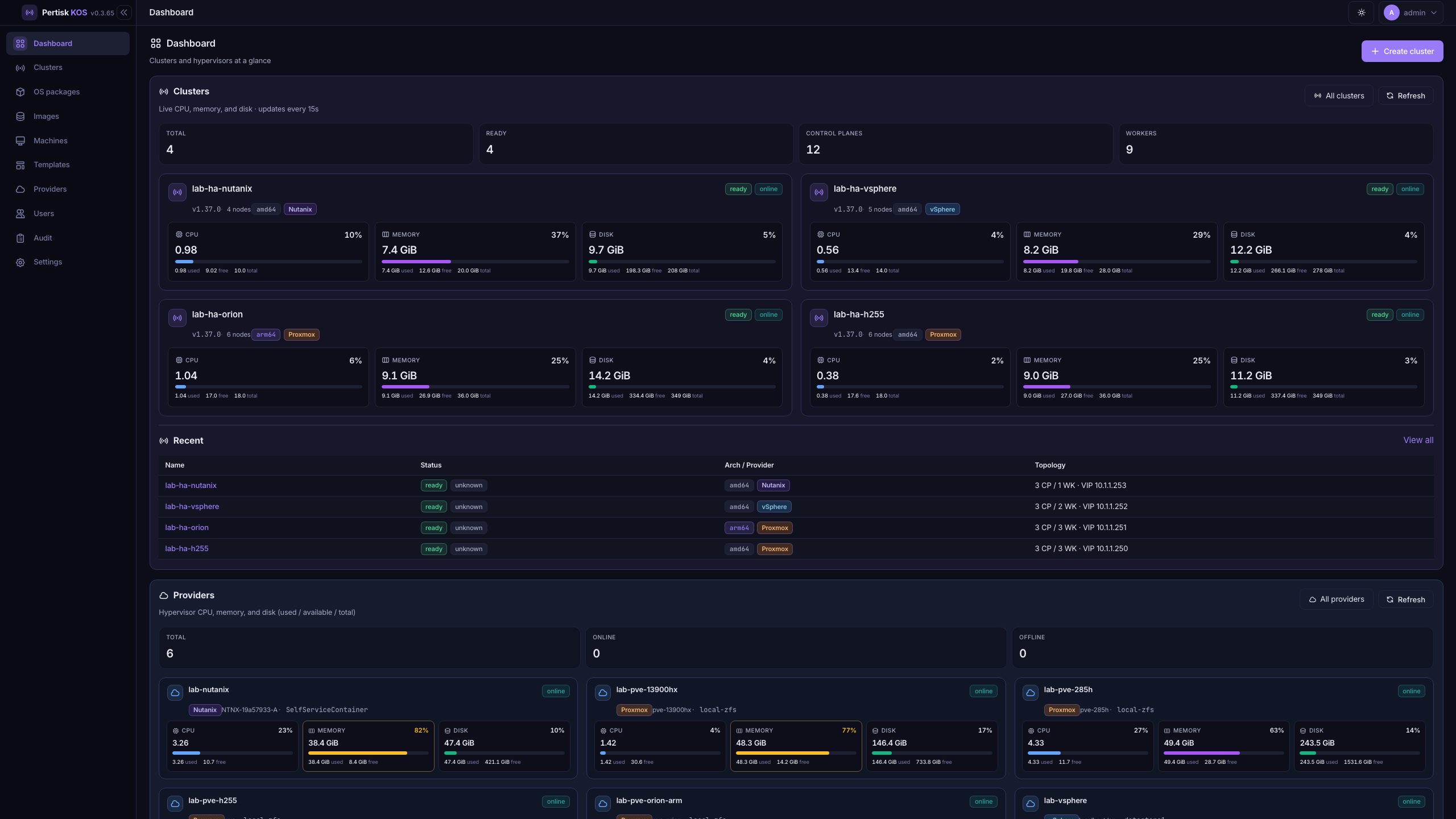
Dashboard
/#/Cluster stats and cards (CPU / memory / disk) stacked above provider cards. Recent clusters table.
- Create cluster
- All clusters
- All providers
- Refresh
- Open a cluster or provider card
Clusters
/#/clustersAll clusters: status, arch, provider, topology, resource bars, network, CNI.
- Create cluster
- Open a row for cluster detail
Create cluster
/#/clusters?new=1Wizard: General → Network → Size → Verify (image, VMID, VIP).
- Next / Back
- Cancel
- Create (starts a job)
Cluster detail
/#/clusters/:idHeader stats plus tabs: Overview, Nodes, K8s, Add-ons, Shell, Config, Upgrade, Jobs.
- Download kubeconfig
- Download config ZIP
- Export to Terraform
- Delete
- Copy / View kubeconfig (Overview)
Nodes
/#/clusters/:id?tab=nodesGuest inventory, live online/offline, CPU / memory / disk, hardware.
- Add node (Create VM / Adopt / Join)
- Reboot
- Resize hardware
- Bulk reboot / remove
- Open node
Node detail
/#/clusters/:id/nodes/:nidInventory, Machine Health, live charts, log tail, TPM Quote.
- Enroll AK
- Verify Quote
- Refresh / Follow logs
K8s
/#/clusters/:id?tab=k8sLive workloads via kubectl on the mgmt host (ready clusters).
- Filter namespace / kind
- Refresh
- Scale
- Restart
- Delete
Add-ons
/#/clusters/:id?tab=addonsAutoscaling, Certificates, Ingress, Storage & network.
- Check config
- Install / Update
- Refresh
Shell
/#/clusters/:id?tab=shellOS shell on the management host with KUBECONFIG set (operator+).
- kubectl / helm in the terminal
Config
/#/clusters/:id?tab=configMachine config YAML editor.
- Apply to all nodes
Upgrade
/#/clusters/:id?tab=upgradeRolling Kubernetes upgrade and signed OS A/B upgrade.
- Start rolling upgrade
- Start OS upgrade
Jobs
/#/clusters/:id?tab=jobsJob history with kind, status, time, duration, and color log.
- Select job
- Refresh
- Follow
OS packages
/#/os-packagesSigned A/B OS bundles in the catalog.
- Upload bundle
- Upgrade clusters
- Delete
Images
/#/imagesCloud qcow2 catalog (amd64 / arm64) used to create VMs.
- Upload
- Delete
Machines
/#/machinesAll guests across clusters, live online/offline.
- Filter
- Refresh
- Open a node
Templates
/#/templatesReusable machine-config YAML snippets.
- Create
- Edit
- Delete
Providers
/#/providersHypervisors with live CPU / memory / disk.
- Add provider
- Edit
- Test
- Delete (admin)
- Open dashboard
Provider dashboard
/#/providers/:idHypervisor capacity gauges for the selected host / storage.
- Refresh
- Back to providers
Users
/#/usersLocal and Auth0 identities (admin only).
- Create user
- Change role
- Enable / disable
- Send reset email
Audit
/#/auditAction log with user, resource, and detail.
- Filter action / resource
- Refresh
- Paging
Settings
/#/settingsRead-only session, service, paths, auth, and email config.
- Switch tabs (Session / Service / Paths / Authentication / Email)
Screenshots


Clone
git clone https://github.com/pertisktech/pertisk-kos.git