 Pertisk
Documentation
Pertisk Proxy Docs
Run the Pingora + HTTP/3 reverse proxy or Kubernetes Ingress controller.
Overview
Pertisk Proxy is a shared data plane built on Cloudflare Pingora (HTTP/1.1 + HTTP/2) and Quiche (HTTP/3). Two binaries, one stack:
| Binary | Mode | Purpose |
|---|---|---|
pertisk-proxy |
proxy | Standalone reverse proxy — sites, TLS, and edge rules in SQLite (Admin UI) |
pertisk-proxy-ingress |
ingress | Kubernetes Ingress controller — watches Ingress / Gateway API resources |
The Admin UI (proxy mode) is what the live demo shows: dashboard, sites, reverse tunnels, GeoIP access lists, WAF, Let’s Encrypt, DNS providers, logs, metrics, backup, and settings.
Live demo: admin.tools.pertisk.com — admin / admin
Screenshots
From the live demo. Recapture (Playwright):
KOS_USER=admin KOS_PASS=admin npm run capture:proxyFiles: public/images/projects/proxy/. Ingress-only pages are skipped when that mode is not in the sidebar.
Sign-in and overview


Routing


Security, TLS, and DNS


Observe and system


Admin UI
BrowserRouter app (path routes, not hash). Chrome on every signed-in page: grouped sidebar (collapse), Proxy mode / Ingress mode badge, + Create, theme toggle, user menu (Profile, Change password, Logout).
+ Create opens: Site, DNS provider, Import certificate, Access Control, WAF.
| Page | Path | Shows / actions |
|---|---|---|
| Login | /login |
Username, password, Remember password, Sign in, theme toggle |
| Dashboard | / |
Version, uptime, sites/routes, H2/H3, host CPU/memory, ports, performance tuning, Prometheus |
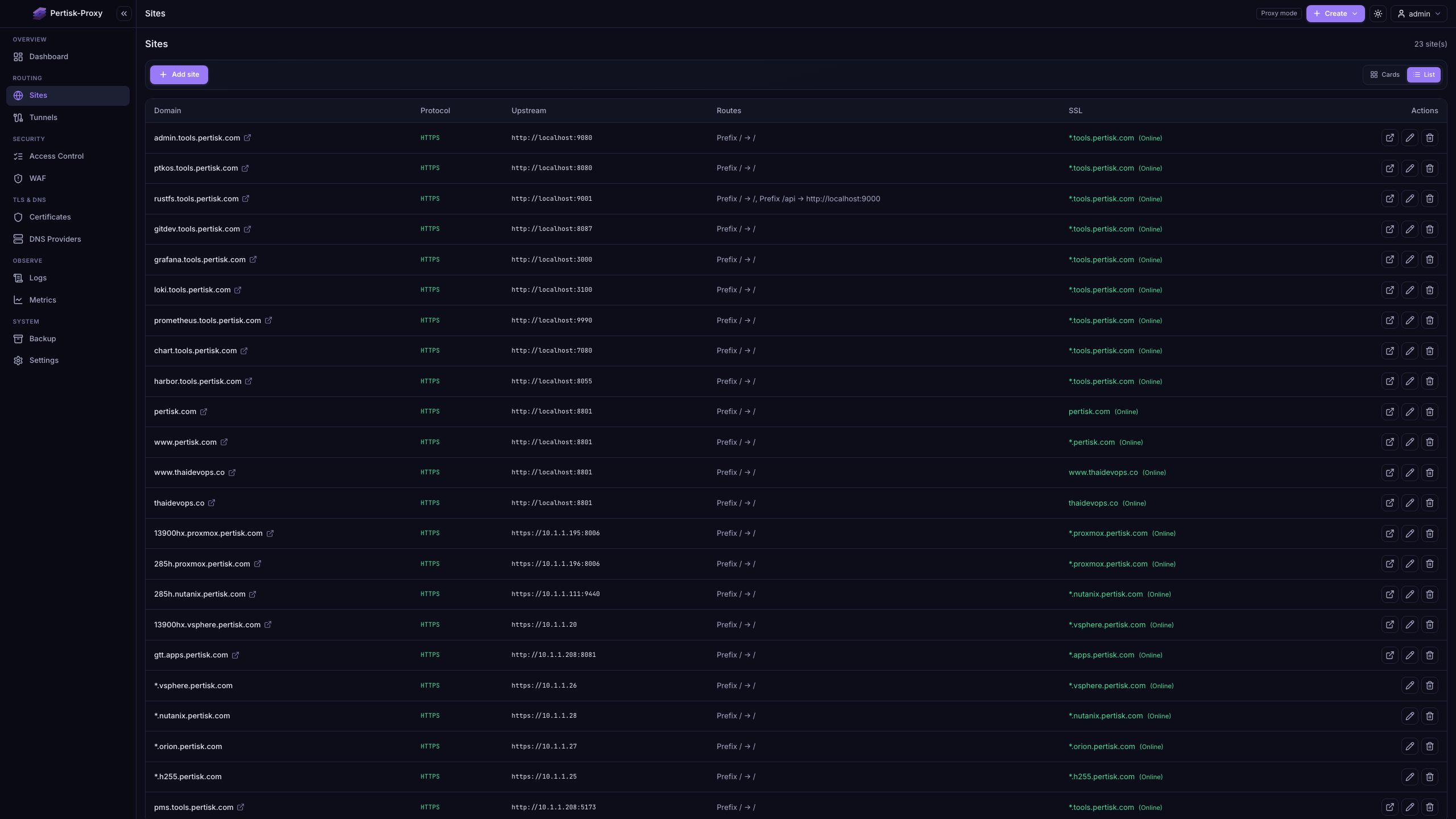
| Sites | /sites |
Domain, protocol, upstream, routes, SSL — Cards/List, Add site, Edit, Delete |
| Add / Edit site | /sites?new=1 |
General: domain, upstream, TLS (None / Existing cert / Generate SSL), routes. Advanced: client IP, access list, WAF policy |
| Tunnels | /tunnels |
Live pertisk-tunnel-server status; Refresh |
| Access Control | /access-lists |
GeoIP allow/deny profiles — attach on a site’s Advanced tab |
| WAF | /waf |
WAF / bot / captcha policies — attach on a site’s Advanced tab |
| Certificates | /certificates |
Let’s Encrypt + uploaded certs; Import; expiry / next renew / sites |
| DNS Providers | /dns-providers |
ACME DNS-01 solvers (e.g. Cloudflare) |
| Logs | /logs |
HTTP vs System, host filter, auto-refresh 3s |
| Metrics | /metrics |
Live H2/H3, connections, per-site totals, charts |
| Backup | /backup |
Export JSON (download or S3), restore, merge |
| Settings | /settings |
Tabs: General, Certificates, Notifications, Storage, Performance |
| Profile | /profile |
Change password (proxy mode) |
Ingress mode swaps Sites / Tunnels / DNS Providers for Ingress (/sites/ingress) and optional Gateway API pages. The demo is proxy mode.
Sites
Add a site from Sites → Add site, or + Create → Site.
| Tab | Field | Detail |
|---|---|---|
| General | Domain / upstream | Hostname and default backend (http://localhost:8080 or https://… for TLS backends) |
| General | SSL / TLS | None (plain HTTP), Existing cert (reuse a Certificates row, including *.tools.pertisk.com), or Generate SSL (ACME HTTP-01 or DNS-01) |
| General | Routes | Prefix / Exact / ImplementationSpecific. Default upstream unless a route sets its own (e.g. /api → another port) |
| Advanced | Client IP | Forward X-Real-IP / X-Forwarded-For |
| Advanced | Access Control | Attach a GeoIP list from /access-lists |
| Advanced | WAF | Attach a WAF / bot / captcha policy from /waf |
| List column | Shows |
|---|---|
| Domain | Public hostname |
| Protocol | HTTP or HTTPS |
| Upstream | Default backend |
| Routes | Path match → rewrite / override |
| SSL | Online / Pending / Expired |
Tunnels
Reverse tunnels from a laptop or homelab to the VPS. Public HTTPS stays on Sites.
- Run
pertisk-tunnel-serveron the VPS with a strong token. Open firewall UDP 7000 only. - Run
pertisk-tunnel-clienton the local machine with the same token and matching tunnel names. - Create a Site whose upstream is
http://127.0.0.1:<remote_port>(orhttps://…so TLS bytes pass through).
Admin Tunnels polls http://127.0.0.1:7700/status (override PERTISK_TUNNEL_STATUS_URL). If the server is not running, the page shows that error — as on the demo.
Full guide: docs/tunnel.md.
Access Control and WAF
Create reusable profiles, then attach them per site (Advanced tab). Empty states in the demo: “Create a GeoIP allow/deny profile…” and “Create a WAF / bot / captcha profile…”.
| Profile | Page | What it sets |
|---|---|---|
| Access list | /access-lists |
GeoIP allow/deny countries and ASNs |
| WAF policy | /waf |
Builtin or custom WAF, bot challenge/block scores, captcha |
Edge order after route match: GeoIP → captcha endpoints → WAF → bot score. Challenge page: /.pertisk/captcha. Ingress uses the same chain via proxy.pertisk.tech/* annotations.
Certificates and DNS
| Page | Shows |
|---|---|
| Certificates | Domain (often a wildcard), issuer (Let’s Encrypt or uploaded), challenge (HTTP-01 / DNS-01), expiry, next renew (~30 days before), sites using it |
| DNS Providers | ACME DNS-01 solvers (Cloudflare and others the API advertises). Generate SSL with DNS-01 picks a provider from this list |
Import certificate uploads PEM. Credentials are not in backups — re-add providers after restore. Default Let’s Encrypt contact email: Settings → Certificates.
Logs and metrics
| Page | Shows |
|---|---|
| Logs | HTTP access (method, proto, host, path, upstream, status, duration) or System events. Host filter + auto-refresh 3s |
| Metrics | Totals (requests, connections, bytes, upstream errors, GeoIP blocked), H2 vs H3, process CPU/RSS, protocol bars, per-site H2/H3. Live refresh |
Prometheus scrape is linked from the dashboard (:9990/metrics by default).
Backup and settings
Backup exports site config, TLS metadata, and DNS provider names as JSON (proxy) or YAML (ingress). Download, or upload to S3 when Storage is configured. Restore can merge (keep existing hosts, add new ones). DNS provider secrets are omitted.
Settings (proxy mode)
| Tab | Contents |
|---|---|
| General | Version, auth (default admin / admin in SQLite — change from Profile), env (PERTISK_DB_PATH, PERTISK_MANAGEMENT_ADDR) |
| Certificates | Default ACME contact email |
| Notifications | SMTP |
| Storage | S3 for backups |
| Performance | Effective runtime (Pingora workers, H3, BBR, file limits) — needs restart / Helm redeploy to change |
Quick start — deploy
Linux one-liner: latest GitHub proxy package (DEB / RPM / tarball), then enable pertisk-proxy. Needs curl, systemd, and amd64 or arm64.
curl -sfL https://get.proxy.pertisk.com | sh -Same script from GitHub (use this if the hostname cert is missing — a *.pertisk.com wildcard does not cover get.proxy.pertisk.com):
curl -sfL https://github.com/pertisktech/pertisk-proxy/releases/latest/download/get.sh | sh -| Env | Effect |
|---|---|
INSTALL_PERTISK_VERSION=0.1.87 |
Pin a release (with or without v) |
INSTALL_PERTISK_TYPE=deb|rpm|tar |
Skip distro detection |
INSTALL_PERTISK_SKIP_START=1 |
Install only; do not start systemd |
INSTALL_PERTISK_SKIP_ENABLE=1 |
Start now, do not enable on boot |
After install:
Admin UI:   http://127.0.0.1:9080   (login admin / admin — change this)
Config:     /etc/pertisk-proxy/pertisk-proxy.conf
Status:     sudo systemctl status pertisk-proxy
Logs:       sudo journalctl -u pertisk-proxy -f
Management listen defaults to 127.0.0.1:9080. Publish it behind this proxy or an SSH tunnel — do not expose :9080 on the public internet. Kubernetes Ingress is a separate Helm chart, not this installer.
Quick start — standalone (from source)
git clone https://github.com/pertisktech/pertisk-proxy.git
cd pertisk-proxy
cargo build --release --bin pertisk-proxy

export ROUTES_CONFIG=./config/examples/routes.yaml
export ENABLE_H3=false
cargo run --bin pertisk-proxy
# or: make run
Default management API listen: [::]:9080 (IPv4 + IPv6).
Quick start — Ingress
cargo build --release --bin pertisk-proxy-ingress --features ingress

export INGRESS_CLASS=pertisk
cargo run --bin pertisk-proxy-ingress --features ingress
# or: make run-ingress
Helm
make deploy-ingress VERSION=0.1.0
# or
make docker-ingress-multi VERSION=0.1.0
make deploy-ingress-helm VERSION=0.1.0
Modes
Standalone reverse proxy
Sites live in SQLite (PERTISK_DB_PATH, default /var/lib/pertisk-proxy/proxy.sqlite on packages). Optional one-time import from a routes file:
routes:
  - host: app.example.com
    path: /api
    path_type: prefix
    upstream: http://backend:8080
Then manage HTTPS, access lists, and WAF in Admin.
Kubernetes Ingress controller
Deploy with Helm. The controller watches Ingress (and optional Gateway API) objects and programs the same Pingora + HTTP/3 data plane. Admin Ingress writes proxy.pertisk.tech/* annotations.
Edge chain
After route match, filtering runs:
- GeoIP — access list allow/deny by country or ASN
- Captcha endpoints — challenge routes
- WAF — request filtering
- Bot score — challenge or block by score
Proxy: attach lists/policies on the site Advanced tab. Ingress: same fields as annotations (proxy.pertisk.tech/geoip-*, waf-*, bot-*, captcha-*). Challenge page: /.pertisk/captcha.
GeoIP databases
mkdir -p /var/lib/pertisk-proxy/geoip
# Country MMDB + ASN (MaxMind or ip2asn TSV)
Override with PERTISK_GEOIP_COUNTRY_DB / PERTISK_GEOIP_ASN_DB. Optional: PERTISK_CAPTCHA_SECRET for stable captcha cookies.
Config essentials
| Variable | Default | Notes |
|---|---|---|
ROUTES_CONFIG |
— | Optional one-time YAML import; sites live in SQLite |
PERTISK_DB_PATH |
./data/proxy.sqlite |
Proxy config DB (packages: /var/lib/pertisk-proxy/proxy.sqlite) |
PERTISK_MANAGEMENT_ADDR |
127.0.0.1:9080 |
Admin UI / management API |
LISTEN_HTTP / LISTEN_HTTPS |
:80 / :443 |
Proxy listeners |
ENABLE_H3 |
true |
HTTP/3 |
INGRESS_CLASS |
— | Ingress filter |
AUTO_HTTPS |
false |
HTTP→HTTPS redirect |
Health: /healthz, /readyz.
Full documentation
Deep dives live in the repo:
- README — binaries, packaging, annotations
- Reverse tunnels
- Performance tuning